> ## Documentation Index
> Fetch the complete documentation index at: https://help.bidright.com/llms.txt
> Use this file to discover all available pages before exploring further.
# Auto Rate (AI)
> Auto Rate builds a proposed starting linehaul rate for every lane you've marked interest on, with reasoning attached.
## Summary
Auto Rate builds a proposed starting linehaul rate (fuel excluded) for every lane you've marked interest on. It works the way a good pricing analyst works: anchor on what you already charge, sanity-check that anchor against the market, adjust for profitability and how badly you want the lane, then show the reasoning, lane by lane.
**Auto Rate proposes. You decide.** Every rate it sets is a starting point for your review, not a final answer. Nothing is decided black-box: every lane comes with its reasoning attached.
## When to use this
You've finished the Interest stage on a bid and want a fast, defensible first pass at rates.
You're staring at hundreds or thousands of lanes and need a starting point on all of them.
You want to understand why Auto Rate landed on a particular number.
You're deciding what to put in the Pricing note or Market Temperature before running it.
***
## Before you run Auto Rate
Three things shape the result before you ever click the button. Get these right and Auto Rate does far better work.
Auto Rate only prices lanes with interest marked. Lanes without interest are skipped entirely.
Interest also tunes aggressiveness. High-interest lanes are priced slightly more competitively to improve your odds of winning. Low-interest lanes are priced firmer, accepting a higher chance of losing the lane. Medium is neutral.
Market Temperature lives in Pricing Defaults. It's your read on the freight market right now: On Fire, Hot, Neutral, Cold, or Very Cold. Auto Rate weights it heavily when judging how aggressive rates can be. Full breakdown in the [Market Temperature](#market-temperature) section below.
The Pricing note on a bid (marked **Guides Auto Rate**) is read as your strategy for this customer. A sentence or two is plenty:
* *"Protect this incumbent volume. Don't rock the boat."* → tightens how closely Auto Rate holds your existing rates
* *"We're willing to lose freight here. Get paid."* → leans rates higher
* *"Want to grow this network. Let's win it."* → leans rates more competitive
* *"These rates are stale and need a reset."* → allows more movement off your historical rate
Strategy tunes the stance. It never overrides the data. Auto Rate won't invent numbers or ignore a floor because the note sounds urgent.
***
## Running Auto Rate
From the bid's rate grid, choose **Auto Rate**. A confirmation dialog tells you how many lanes will be priced and what Market Temperature is currently set.
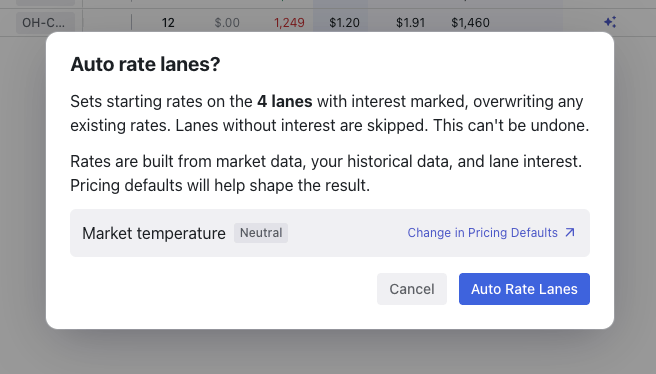 **Auto Rate overwrites existing rates on lanes with interest marked, and this can't be undone.** If you've hand-priced lanes you want to protect, run Auto Rate first and do your manual work on top of its output, not the other way around.
Click **Auto Rate Lanes** to run. Rates populate in the New Rates columns, and each auto-rated lane gets a rate logic indicator you can open to see the reasoning.
***
## What Auto Rate looks at
Auto Rate works strictly from the data on the lane. It does not invent market data, volumes, or operating ratios that aren't there. When data is thin, that uncertainty shows up in the confidence level instead of a guessed number.
| Input | How Auto Rate uses it |
| ---------------------------------------------- | -------------------------------------------------------------------------------------------------------------------------------------------------------------------------------------------------------------------------------------------------------------------------------------------------------------- |
| **Your history with this customer** | If you've hauled this customer's freight on this lane in the trailing 12 months, that incumbent rate is the anchor. The more loads behind it, the tighter Auto Rate holds. A lane with heavy volume effectively defines the bid for that customer, and Auto Rate won't move far off it without a clear reason. |
| **Your history on the lane (other customers)** | If you run this lane but not for this customer, that history still informs the rate. It is held more loosely, as supporting data rather than an incumbent rate. |
| **Carrier First rates** | Verified carrier-hauled market rates through FreightMath. The more granular the match (area-to-area being the strongest), the more weight it carries. |
| **Market rate** | The long-established market benchmark, linehaul only. Carries weight with shippers, so Auto Rate treats it as a real reference point. |
| **Custom rate** | If you brought your own benchmark into the bid, Auto Rate reads it as an additional market reference. |
| **Network profitability (OR)** | The lane's FreightMath OR, the lane in isolation, and the inbound/outbound picture at each end. A lane losing money is a reason to push for an increase. A destination that's hard to leave argues for a higher inbound rate. |
| **Customer target rate** | Usually blank in round 1, populated from round 2 on. Treated as a directional signal only. Customers push every rate lower, so it's never an override. |
| **Lane interest and your Pricing note** | Tune how aggressive or firm the rate is. When the two disagree, the lane's interest wins (it's the more specific signal), and Auto Rate notes the conflict in its reasoning. |
***
## How Auto Rate decides
Start from the most trustworthy rate available. Freight you already haul for this customer anchors on your historical rate. New lanes anchor on market rates.
Compare the anchor against Carrier First, market, and custom rates. Market sitting well above your incumbent rate is real opportunity: lean up. Market at or below the anchor: hold the incumbent. On new lanes, the rate stays inside the band those references define.
Market Temperature first, then your bid strategy, then lane profitability, then interest level, then any customer target rate.
Auto Rate sets the rate, assigns a confidence level, and writes out its reasoning across Anchor, Historical, and Market Data.
***
## Market Temperature
Your read on the market, set in Pricing Defaults. This is the single biggest lever you control.
**Auto Rate overwrites existing rates on lanes with interest marked, and this can't be undone.** If you've hand-priced lanes you want to protect, run Auto Rate first and do your manual work on top of its output, not the other way around.
Click **Auto Rate Lanes** to run. Rates populate in the New Rates columns, and each auto-rated lane gets a rate logic indicator you can open to see the reasoning.
***
## What Auto Rate looks at
Auto Rate works strictly from the data on the lane. It does not invent market data, volumes, or operating ratios that aren't there. When data is thin, that uncertainty shows up in the confidence level instead of a guessed number.
| Input | How Auto Rate uses it |
| ---------------------------------------------- | -------------------------------------------------------------------------------------------------------------------------------------------------------------------------------------------------------------------------------------------------------------------------------------------------------------- |
| **Your history with this customer** | If you've hauled this customer's freight on this lane in the trailing 12 months, that incumbent rate is the anchor. The more loads behind it, the tighter Auto Rate holds. A lane with heavy volume effectively defines the bid for that customer, and Auto Rate won't move far off it without a clear reason. |
| **Your history on the lane (other customers)** | If you run this lane but not for this customer, that history still informs the rate. It is held more loosely, as supporting data rather than an incumbent rate. |
| **Carrier First rates** | Verified carrier-hauled market rates through FreightMath. The more granular the match (area-to-area being the strongest), the more weight it carries. |
| **Market rate** | The long-established market benchmark, linehaul only. Carries weight with shippers, so Auto Rate treats it as a real reference point. |
| **Custom rate** | If you brought your own benchmark into the bid, Auto Rate reads it as an additional market reference. |
| **Network profitability (OR)** | The lane's FreightMath OR, the lane in isolation, and the inbound/outbound picture at each end. A lane losing money is a reason to push for an increase. A destination that's hard to leave argues for a higher inbound rate. |
| **Customer target rate** | Usually blank in round 1, populated from round 2 on. Treated as a directional signal only. Customers push every rate lower, so it's never an override. |
| **Lane interest and your Pricing note** | Tune how aggressive or firm the rate is. When the two disagree, the lane's interest wins (it's the more specific signal), and Auto Rate notes the conflict in its reasoning. |
***
## How Auto Rate decides
Start from the most trustworthy rate available. Freight you already haul for this customer anchors on your historical rate. New lanes anchor on market rates.
Compare the anchor against Carrier First, market, and custom rates. Market sitting well above your incumbent rate is real opportunity: lean up. Market at or below the anchor: hold the incumbent. On new lanes, the rate stays inside the band those references define.
Market Temperature first, then your bid strategy, then lane profitability, then interest level, then any customer target rate.
Auto Rate sets the rate, assigns a confidence level, and writes out its reasoning across Anchor, Historical, and Market Data.
***
## Market Temperature
Your read on the market, set in Pricing Defaults. This is the single biggest lever you control.
 | Temperature | What Auto Rate does |
| ------------- | --------------------------------------------------------------------------------------------------------------------------------------------------------------------------------------------------------------------------------------------------------------------------------------------------- |
| **On Fire** | Your historical rate becomes a hard floor on incumbent lanes. Auto Rate will never propose below it, even when market references read lower, because published market data lags a rising market. Rates lean toward the top of the market band and above. Capture rate while the market supports it. |
| **Hot** | Leans upward from the anchor. Market references at or below the anchor are discounted. Increases need less justification than normal. The spread is more likely to widen than close. |
| **Neutral** | No thumb on the scale. Rates follow the data as written. |
| **Cold** | Defensive. Protects incumbent volume and doesn't chase market spread upward. Shippers rebid lanes that look expensive. Increases need real profitability justification; cosmetic increases aren't worth the rebid risk. |
| **Very Cold** | Volume protection. Incumbent anchors held tight, increases only on lanes actively losing money, and new business priced close to market. Expects shipper pressure on every lane. Confidence in winning at elevated rates reads lower. |
***
## Reading the results
Open the rate logic indicator on any auto-rated lane to see how Auto Rate got there.
| Temperature | What Auto Rate does |
| ------------- | --------------------------------------------------------------------------------------------------------------------------------------------------------------------------------------------------------------------------------------------------------------------------------------------------- |
| **On Fire** | Your historical rate becomes a hard floor on incumbent lanes. Auto Rate will never propose below it, even when market references read lower, because published market data lags a rising market. Rates lean toward the top of the market band and above. Capture rate while the market supports it. |
| **Hot** | Leans upward from the anchor. Market references at or below the anchor are discounted. Increases need less justification than normal. The spread is more likely to widen than close. |
| **Neutral** | No thumb on the scale. Rates follow the data as written. |
| **Cold** | Defensive. Protects incumbent volume and doesn't chase market spread upward. Shippers rebid lanes that look expensive. Increases need real profitability justification; cosmetic increases aren't worth the rebid risk. |
| **Very Cold** | Volume protection. Incumbent anchors held tight, increases only on lanes actively losing money, and new business priced close to market. Expects shipper pressure on every lane. Confidence in winning at elevated rates reads lower. |
***
## Reading the results
Open the rate logic indicator on any auto-rated lane to see how Auto Rate got there.
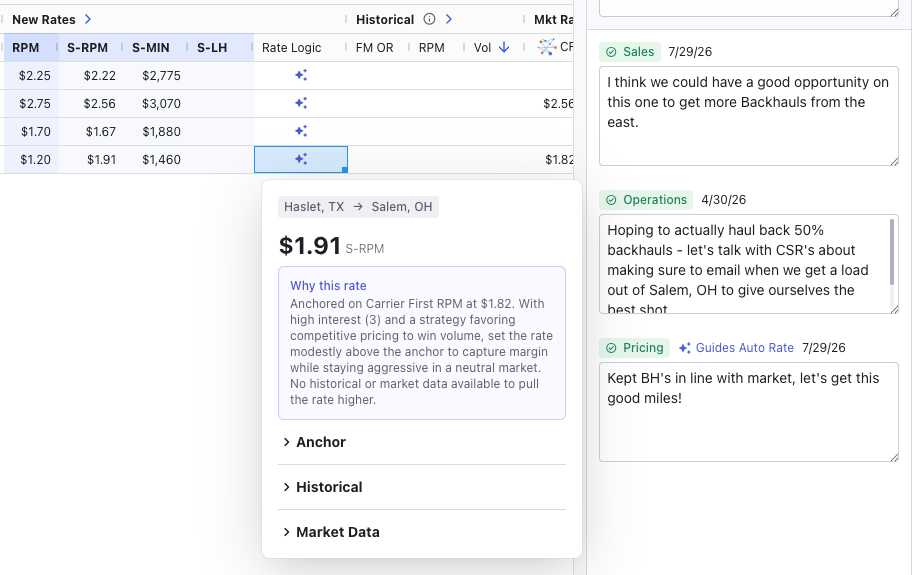 * **Why this rate:** plain-language bottom line: the anchor, and what moved the rate off it if anything did.
* **Anchor:** which value Auto Rate anchored on (Historical RPM, Carrier First Rate, or Market RPM), why, and how tightly it held.
* **Historical:** what your load history contributed: volume, incumbent rate, match quality, and profitability signals.
* **Market Data:** the sanity check: how the anchor compared to Carrier First, market, and custom rates, and how Market Temperature shaped that read.
Every rate also carries a **confidence level**: Auto Rate's own read on how realistic the proposal is given the data it had. Thin data means lower confidence, and lower confidence means the lane deserves a closer look from you.
***
## What to watch for
* **Review every rate.** Auto Rate is a strong first pass, not a submit button. Spend your attention on high-volume incumbent lanes and anything with low confidence.
* **Write a real Pricing note.** One simple honest sentence of intent measurably changes the output. "Win this network" and "hold firm, we're full" produce very different bids.
* **Set Market Temperature honestly.** Auto Rate trusts your read. If you're not sure, Neutral lets the data speak for itself.
* **Thin data still gets a rate.** Auto Rate will default to pricing at a 90 OR if there is no data to help begin a starting rate.
* **Similar lanes can get different rates.** That's usually correct. Different load history, match quality, profitability, or interest all move the number. Open the rate logic on each to see what diverged.
***
## Related content
* [Price with One Number](/concepts/price-with-one-number): How the rate Auto Rate proposes becomes S-RPM and shipper rates
* [FreightMath OR (Operating Ratio)](/freightmath/operating-ratio): What the OR values Auto Rate reads actually measure
* [Area Control](/concepts/area-control): How lanes get tagged for interest in the first place
* [How to think about lanes](/tips/thinking-about-lanes): Evaluating lanes before and after the first pass
* [The 6 Stage Workflow](/concepts/six-stage-workflow): Where Interest and Pricing fit in the bid lifecycle
* **Why this rate:** plain-language bottom line: the anchor, and what moved the rate off it if anything did.
* **Anchor:** which value Auto Rate anchored on (Historical RPM, Carrier First Rate, or Market RPM), why, and how tightly it held.
* **Historical:** what your load history contributed: volume, incumbent rate, match quality, and profitability signals.
* **Market Data:** the sanity check: how the anchor compared to Carrier First, market, and custom rates, and how Market Temperature shaped that read.
Every rate also carries a **confidence level**: Auto Rate's own read on how realistic the proposal is given the data it had. Thin data means lower confidence, and lower confidence means the lane deserves a closer look from you.
***
## What to watch for
* **Review every rate.** Auto Rate is a strong first pass, not a submit button. Spend your attention on high-volume incumbent lanes and anything with low confidence.
* **Write a real Pricing note.** One simple honest sentence of intent measurably changes the output. "Win this network" and "hold firm, we're full" produce very different bids.
* **Set Market Temperature honestly.** Auto Rate trusts your read. If you're not sure, Neutral lets the data speak for itself.
* **Thin data still gets a rate.** Auto Rate will default to pricing at a 90 OR if there is no data to help begin a starting rate.
* **Similar lanes can get different rates.** That's usually correct. Different load history, match quality, profitability, or interest all move the number. Open the rate logic on each to see what diverged.
***
## Related content
* [Price with One Number](/concepts/price-with-one-number): How the rate Auto Rate proposes becomes S-RPM and shipper rates
* [FreightMath OR (Operating Ratio)](/freightmath/operating-ratio): What the OR values Auto Rate reads actually measure
* [Area Control](/concepts/area-control): How lanes get tagged for interest in the first place
* [How to think about lanes](/tips/thinking-about-lanes): Evaluating lanes before and after the first pass
* [The 6 Stage Workflow](/concepts/six-stage-workflow): Where Interest and Pricing fit in the bid lifecycle