

Summary
Area Control is where you tell BidRight exactly how you want your network to work. You define the lanes that matter to you, from any area in the US or Canada, to the areas you want to run to from there, and BidRight remembers it. Then, every time you upload a bid, lanes that match your strategy are automatically tagged for interest, so your team can review thousands of lanes in the time it used to take to work through a handful.When to use this
Setting up BidRight
You’re setting up BidRight and want lane evaluation to reflect your network from day one.
Strategy has shifted
New markets you’re targeting, or new priorities from ops or sales.
Understanding Auto Interest
You want to understand where the Auto Interest labels on your bid lanes come from.
The problem Area Control solves
Every carrier knows their network. More precisely, certain people know it. The knowledgeable folks in ops, sales, and pricing who’ve been there a while. That knowledge lives in their heads, or scattered across Word documents, strategy drafts, and old emails. The result: every bid gets re-evaluated and re-decided lane by lane, based on whatever the most recent information in the room happens to be. Area Control puts that knowledge on paper: one shared picture of your network that every bid is checked against.How it works
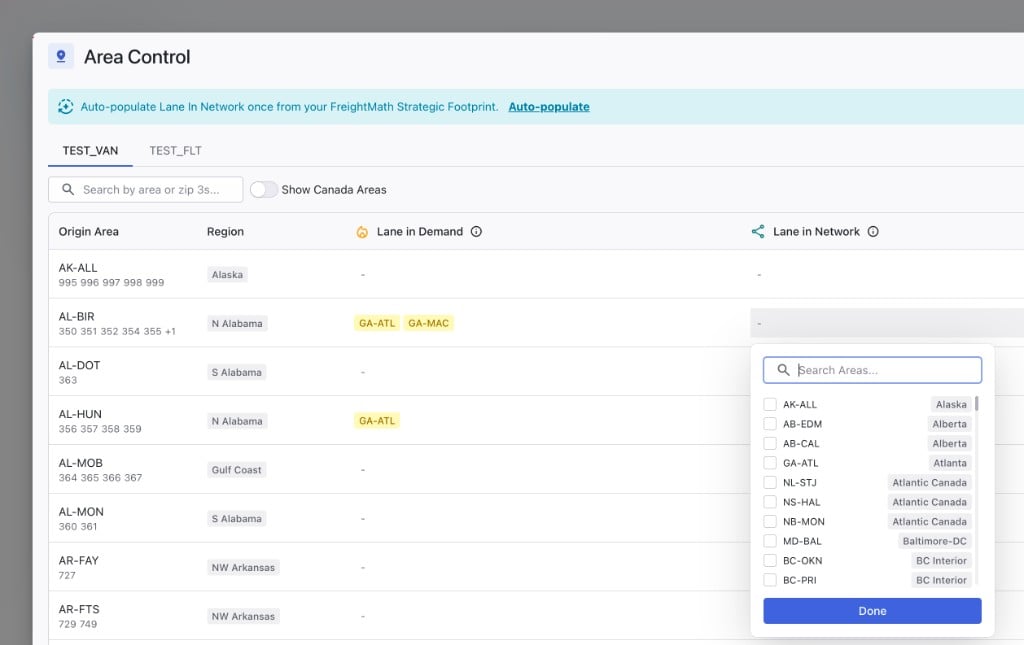
You’ll find Area Control in the sidebar. It lists all your areas: named zones that represent groups of Zip-3 codes, covering the US and Canada. You can open any area and see exactly which ZIPs make it up. From any area, you select the other areas you want to get to from there. Each origin-to-destination pair you define becomes part of your network picture, in one of two categories.Network Strategy vs. Lanes in Demand
The difference between the two is simple: how badly do you want the lane? Network Strategy: “This would be solid.” Lanes that fit how you operate. It’s what you do, or a good place to go from that origin, and you’d happily take more of it. Most of your defined lanes should live here. Lanes in Demand: Lanes you want to target heavily from that origin. When one of these shows up in a bid, it’s suggested as a high-interest lane. There shouldn’t be many of them. If everything is in demand, nothing is. Note that neither category is about whether you currently run the lane. Both can be freight you have today or freight you’re going after. The category tells your team how hard to lean in when it shows up.The payoff: what happens when you upload a bid
Getting the network out of people’s heads and onto paper is valuable on its own: a shared pool of meaning for your whole team. But it’s not the big value. The big value is this: upload any bid, large or small, and every lane that matches your defined zones gets tagged for Auto Interest, programmatically, which means 9,000 lanes get evaluated essentially instantly. The tag is a suggestion, not a decision. In the Interest stage, filter to the tagged lanes and your team reviews each one:- Agree: approve the suggested interest and move on
- Adjust: the tool knows your geography, but you know the freight. A 3 AM pickup, an undesirable product, a facility you’ve had trouble with: knock the interest down or zero it out
What to watch for
- Set up your network before your next big bid. Area Control pays off most when it’s in place before lanes start flowing through.
- Be stingy with Lanes in Demand. They’re suggested high interest. Reserve them for lanes you genuinely want to go after hard.
- Auto Interest is a starting point, not an answer. The review step is where your operations knowledge gets applied.
- Revisit when your strategy shifts. New customer, new target market, changed priorities: update your defined lanes so the tags stay honest.
What’s coming
Area Control will keep growing. On the roadmap: labeling and tagging areas, and visibility into each area’s balance (whether you consider it a headhaul, neutral, or backhaul market), plus more information to keep your bidding strategic and consistent.Related content
- How to think about lanes: How network fit factors into lane evaluation
- The 6 Stage Workflow: Where the Interest stage fits in the bid lifecycle
- What is FreightMath?: The data behind your historical lane performance
- Pricing areas reference: Area codes and the cities or regions they represent