

Before you start
- A DAT RateView subscription. You run the lookup in DAT, not in BidRight.
- Interest marked on your lanes. The export pulls the lanes you marked interest on, so you only spend DAT credits on freight you actually want. See Mark Interest.
How to get DAT rates
1
Step 1: Mark interest on the lanes you want rates on
In your bid, mark interest on the lanes you want to price against DAT. Only those lanes go into the export, which keeps your credit usage down.
2
Step 2: Export the lanes for DAT
Select Bid Actions → Export → Lanes for DAT Lookup.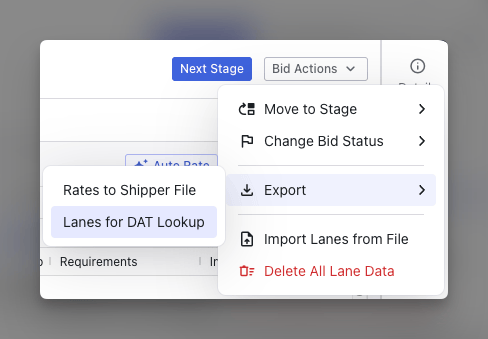
3
Step 3: Run the lookup in DAT
Log in to DAT, then go to RateView → Multi-Lane → New Request.Upload the lane file, select shipper contract rates, and submit the request. When it finishes, download the results file.
4
Step 4: Import the file back into BidRight
Back in BidRight, go to Bid Actions → Import Lanes from File and upload the file you downloaded from DAT.
5
Step 5: Map the rate column
On the import mapping screen, map Contract Average Linehaul Rate to DAT RPM, then finalize the import.BidRight matches rows to lanes on Lane ID. The rates land in the Market RPM column in your bid grid.
What to watch for
- Lane ID is the match key. Do not delete or edit the Lane ID column in the DAT file. If it is missing, rows will not match back to your lanes.
- Lane order does not matter. You can sort, filter, or drop rows in the DAT file. Only the rows you leave in get imported.
- You can import a subset. Run DAT on a handful of lanes and import only those, instead of running the whole bid.
- You can re-import. If you run additional lanes through DAT later, import that file the same way to append the new rates.
- DAT rates are editable inline. Once imported, you can edit the DAT column directly in the lanes grid when you only need to change a few lanes.
What’s coming: connect your DAT key
Connecting your organization’s DAT key directly to BidRight is on the roadmap. With the key connected, DAT rates load in BidRight without the export, lookup, and import round trip — no column mapping or file import required.Related content
- Mark Interest — Flag the lanes worth spending DAT credits on.
- How to Import a Bid File — How import and column mapping work in general.
- Price with One Number — How market rates factor into your pricing decision.